Saturday, August 04, 2007

Making a Desktop Wallpaper #3


The next step is selecting your typefaces, and the layout of your text.  This takes some patience and quite a bit of general messing around until you think it looks good.  It has helped me considerably to look at other designer's work, and glean tidbits of what really stands out as GOOD design.

Again, my apologies for not doing this in the GIMP.  The next tutorial that I do, I'm going to give you all a chance to come up with your own versions, then I'll post the results! :-)  So fire your image editing programs up, and get ready!!!

Labels: , ,

Saturday, July 28, 2007

Making a Desktop Wallpaper #2


The next step after getting your picture and selecting the verse is to figure out what the key points of the verse are, and try to draw the attention of your readers to that point.

“When thou saidst, Seek ye my face; my heart said unto thee, Thy face, LORD, will I seek.” Psalms 27:8


Obviously in this case, “seeking the Lord” is the primary key. Let's try to highlight that point. One of the next steps is to make your text stand out from the page in a way that is not annoyingly obvious, but yet is not hidden. That is where shadows, highlighting, and transparency come into play.

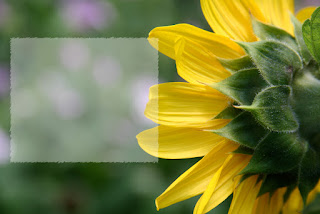
First, let's make a new layer, and make a square selection. Fill that with white, and drop the transparency to about 35% or whatever looks the best for the picture. If you stop right there, it looks fairly good, but it needs a little more pizzaz. That's where Gaussian Blur, and the Smudge tool come in. On this particular photo, I used the the smudge tool to get the ragged edges. Just take the tool, and "smudge" the entire edge of the square, as though it were a square of wet paint. You can play with the settings a little bit to get the desired effect.

That's all for today....

P.S. For those of you who are wondering, this particular tutorial is written for Photoshop... I didn't have enough time to work it out in GIMP... Sorry! Maybe next time!

Labels:

Saturday, July 21, 2007

Making a Desktop Wallpaper Step #1


ISO 100 ~ f/5.6 ~ 1/125 ~ 135mm

First off, we start by framing our picture a little differently than usual.  I usually try to move my subject off to the side, and make the background well blurred.  This technique is also used in magazines and books, when you have a full, two page photo, and the starting article is on the picture.  Trying to get the subject to stand out, while filling the whole page is a nice effect, when used correctly.
The next step is to find a verse or poem that fits not only the subject of the photo, but the mood as well.  That is where your job lies...  I'd like you to find verses or poems that you feel would be fitting for this picture.

...'Till next time...

Labels: , ,

Sunday, July 01, 2007

Yellow Flower (Psalm 8)

ISO 100 ~ f/9 ~ 1/250 ~ 85mm

Labels: ,

Friday, April 20, 2007

Charity Suffereth Long...


I'll be kind of busy for the few days, so you get some older photos, and some Photoshop effects! :-)

Labels: ,